
Is There a Fixed Safe Limit?
For adults, there isn’t a universal number of daily screen hours that can be labelled “too much” for everyone’s eyes. Instead of focusing only on the total number of hours, it is more useful to consider how you use your screen. For example, someone who works eight hours on a computer but regularly takes breaks, blinks frequently, uses an appropriate viewing distance and has a comfortable workstation may experience fewer symptoms than someone who spends several hours continuously staring at a phone. The American Academy of Ophthalmology notes that prolonged digital-device use can cause temporary eye discomfort, but digital screens have not been shown to cause permanent eye damage simply from ordinary screen exposure.
A Better Question to Ask
Instead of asking: “How many hours can I use my phone?”
ask: “Am I using screens in a way that allows my eyes to rest regularly?”
That difference is important for understanding screen time and eye health.
What Happens to Your Eyes During Long Screen Use?
1. You May Blink Less
One of the major reasons screens can cause discomfort is reduced blinking. When concentrating on a computer, phone or tablet, people tend to blink less frequently. This can allow the tear film on the eye surface to become unstable, contributing to dryness and irritation.
2. Your Eyes Keep Focusing at Close Range
Digital devices are generally viewed at a relatively close distance. Maintaining focus on nearby text and images for extended periods can contribute to visual fatigue. You may notice:
- Tired eyes
- Difficulty refocusing
- Temporary blurred vision
- Headache
- Eye discomfort
3. Glare Can Increase Discomfort
Reflections from windows, overhead lights or glossy screens can make it harder to see clearly. This may encourage squinting or uncomfortable viewing positions. Adjusting the lighting and reducing reflections can make screen use more comfortable.
Signs That Your Screen Time May Be Affecting Your Eyes
Not everyone experiences the same symptoms. Common symptoms of digital eye strain include:
Dry or Burning Eyes
Your eyes may feel dry, irritated, burning or gritty after prolonged screen use.
Blurred Vision
Vision may become temporarily blurry or fluctuate after extended near work.
Watery Eyes
Interestingly, dry eyes can sometimes cause excessive watering as the eyes respond to irritation.
Headaches
Eye strain and prolonged focusing can be associated with headaches, particularly after long periods of close-up work.
Light Sensitivity
Some people may become more uncomfortable around bright light after prolonged screen use.
Difficulty Concentrating
Eye discomfort can make it harder to maintain concentration during work or study. These symptoms are commonly associated with eyestrain and digital-device use.
Does Mobile Phone Use Affect Your Eyes?
Mobile Use and Eye Health
Smartphones deserve special attention because they are often held closer to the face than larger screens. Long periods of mobile use can contribute to digital eye strain, particularly when you continuously read small text, watch videos or scroll without taking breaks. The problem is not simply that the device is a phone. The way you use it matters. Try to:
- Avoid holding the phone extremely close to your face.
- Increase text size when necessary.
- Take regular breaks.
- Blink consciously.
- Avoid using the phone in uncomfortable lighting.
- Reduce prolonged late-night use.
The American Academy of Ophthalmology recommends keeping larger screens around arm’s length and positioned slightly below eye level to make viewing more comfortable.
The 20-20-20 Rule: A Simple Habit for Screen Users
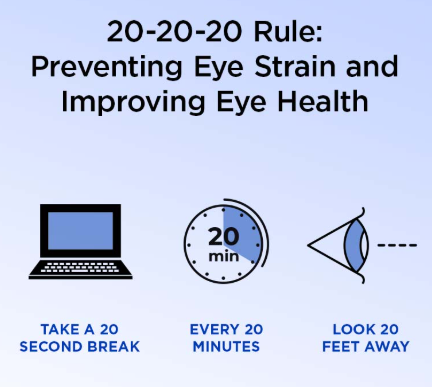
One of the easiest ways to manage screen-related eye strain is the 20-20-20 rule.
Every 20 Minutes
Look away from your screen.
For 20 Seconds
Focus on something approximately 20 feet away.
Why Does It Help?
Looking into the distance gives your eyes a break from continuous close-up focusing. The National Eye Institute and American Academy of Ophthalmology both recommend regular visual breaks, including the 20-20-20 approach, for people who spend substantial time using digital devices.
Tip: Set a reminder on your phone or computer if you frequently forget to take breaks.
10 Ways to Protect Your Eyes During Screen Use
1. Take Regular Screen Breaks

Avoid staring continuously at your screen for long periods. Use the 20-20-20 rule and occasionally stand up, walk around or change your visual focus.
2. Blink More Often
Make a conscious effort to blink normally while working on your computer or using your phone. Regular blinking helps maintain the tear film and can reduce dryness.
3. Keep Your Screen at a Comfortable Distance
For computers, an arm’s-length viewing distance is generally recommended. The screen should also be positioned so you are looking slightly downward rather than directly upward.
4. Adjust Text Size
If you constantly squint or move closer to the screen to read, increase the font size or zoom level. Making text easier to read can reduce unnecessary visual effort.
5. Reduce Glare
Position your screen away from direct sunlight or strong reflections. Adjust room lighting and screen brightness to a comfortable level.
6. Maintain Good Posture
Screen habits affect more than your eyes. Poor positioning can contribute to neck, shoulder and back discomfort. Keep your screen, chair and keyboard positioned comfortably.
7. Keep the Screen Clean
Dust, fingerprints and smudges can reduce screen clarity and make viewing less comfortable. Clean your screen regularly using appropriate manufacturer-recommended methods.
8. Give Contact Lenses a Break When Needed
Some people with contact lenses may experience more dryness during prolonged computer use. If your eyes become uncomfortable, discuss appropriate options with your eye-care professional.
9. Manage Dry Air
Air from fans or air-conditioning can increase eye dryness for some people. Avoid directing strong airflow directly toward your face.
10. Don’t Ignore Persistent Symptoms
If eye discomfort, headaches or vision changes continue despite improving your screen habits, an eye examination can help determine whether an underlying eye or vision problem is contributing.
Is Blue Light From Screens Damaging Your Eyes?
Blue light is one of the most common concerns associated with screen use. However, the American Academy of Ophthalmology states that there is no scientific evidence that the blue light from digital devices causes eye damage or eye disease. That does not mean evening screen use has no effect at all. Blue light exposure in the evening can affect the body’s circadian rhythm and may make it harder for some people to fall asleep. Reducing late-night screen exposure or using night-mode settings may be helpful for sleep.
Do You Need Blue-Light Glasses?
Special blue-light-blocking glasses are not considered necessary simply because you use a computer or smartphone. The AAO notes that evidence does not show these glasses reliably prevent digital eye strain. Comfortable screen habits, regular breaks and appropriate vision correction are more important starting points.
Screen Time and Dry Eyes
Dryness is one of the most common complaints associated with prolonged digital-device use. When you concentrate on a screen, reduced blinking can interfere with the normal spreading of tears over the eye surface. This can lead to:
- Dryness
- Burning
- Grittiness
- Redness
- Watering
- Temporary blurred vision
If you already have dry eye, prolonged screen use may make your symptoms more noticeable. If dryness continues even after improving your screen habits, an eye examination can help identify possible causes and determine whether additional treatment is needed.
Related reading:
Dry Eye Causes, Symptoms & Treatment
Does Screen Time Cause Permanent Eye Damage?
For most adults, ordinary screen use is primarily associated with temporary discomfort and digital eye strain, rather than permanent eye damage from the screen itself. However, persistent symptoms should not automatically be blamed on screen time. Blurred vision, headaches, dryness or eye discomfort can sometimes be related to:
- An incorrect glasses prescription
- Uncorrected refractive error
- Dry eye disease
- Eye-surface problems
- Focusing or eye-coordination issues
- Another underlying eye condition
This is why persistent symptoms deserve proper evaluation rather than simply reducing screen time and assuming the problem is solved.
Screen Time and Eye Health for Children
Children also spend considerable time using smartphones, tablets, computers, televisions and gaming devices. Rather than focusing only on a specific daily number, parents should encourage healthy screen habits, regular breaks and appropriate outdoor activity. Children may not always recognise or explain eye discomfort clearly. Parents should pay attention if a child frequently:
- Rubs their eyes
- Squints
- Holds screens very close
- Complains of headaches
- Blinks excessively
- Avoids reading
- Has difficulty seeing distant objects
- Develops unusual visual behaviour
If there are concerns about a child’s vision, an eye examination is appropriate.
When Should You See an Eye Doctor?

Screen-related discomfort usually improves when the eyes are rested and screen habits are adjusted. However, you should consider an eye examination if symptoms are persistent, recurrent or affecting your daily activities.
Seek professional eye care if you experience:
- Persistent blurred vision
- Frequent headaches associated with visual tasks
- Ongoing eye dryness or burning
- Recurrent redness
- Difficulty focusing
- Double vision
- Significant light sensitivity
- Symptoms that do not improve with rest
- Sudden changes in vision
- Significant eye pain
Sudden vision changes or severe eye pain should be assessed promptly rather than being assumed to be simple screen fatigue.
A Simple Screen-Friendly Eye Care Routine
You don’t necessarily need to stop using screens. Instead, create healthier habits around your everyday use.
Before Screen Use
✔ Make sure your prescription is appropriate
✔ Position your screen comfortably
✔ Adjust lighting
✔ Reduce reflections
During Screen Use
✔ Follow the 20-20-20 rule
✔ Blink regularly
✔ Keep a comfortable viewing distance
✔ Increase text size when needed
After Long Screen Sessions
✔ Look away from the screen
✔ Move around and change your visual focus
✔ Give your eyes time to rest
✔ Pay attention to persistent symptoms
Screen Time and Eye Health: Quick Checklist
| Habit | Why It Matters |
| 20-20-20 rule | Gives your eyes regular distance breaks |
| Frequent blinking | Helps maintain the tear film |
| Comfortable screen distance | Reduces unnecessary near-focus effort |
| Larger text | Makes reading easier |
| Reduced glare | Improves viewing comfort |
| Proper lighting | Reduces visual discomfort |
| Regular eye examinations | Helps identify vision and eye-health problems |
| Appropriate glasses/contact lenses | Corrects vision problems that may worsen strain |
Frequently Asked Questions
How many hours of screen time is too much for your eyes?
There is no universal daily number that is automatically harmful for every adult. Continuous viewing, lack of breaks, poor ergonomics and existing eye problems can increase discomfort. Focus on regular breaks and comfortable screen habits.
Can screen time damage your eyes permanently?
For adults, ordinary digital-screen use has not been shown to cause permanent eye damage simply from exposure. However, prolonged use can cause temporary digital eye strain and may make existing eye problems more noticeable.
Does mobile phone use cause weak eyesight?
Using a smartphone can cause temporary eye strain, especially during prolonged close-up viewing. Persistent changes in vision should be evaluated rather than automatically attributed to phone use.
Does the 20-20-20 rule really help?
It is a widely recommended strategy for reducing digital eye strain. Every 20 minutes, look at something about 20 feet away for at least 20 seconds.
Are blue-light glasses necessary for computer users?
They are not considered necessary simply for computer use. The AAO reports that evidence does not show blue-light-blocking glasses prevent digital eye strain.
Why do my eyes become dry when I use my phone?
People tend to blink less when concentrating on screens. Reduced blinking can contribute to tear-film instability and dry-eye symptoms.
Can screen time cause headaches?
Yes. Eye strain associated with prolonged screen use can be accompanied by headaches, particularly when viewing conditions, focusing demands or an uncorrected vision problem contribute to discomfort.
When should I get an eye examination for screen-related problems?
If symptoms such as blurred vision, dryness, headaches or eye discomfort continue despite taking breaks and improving screen habits, schedule an eye examination.
Conclusion
Screens are an important part of modern work, education and everyday life, so completely avoiding them is usually unrealistic. The key to better screen time and eye health is learning how to use digital devices in a more eye-friendly way. Take regular breaks, follow the 20-20-20 rule, blink frequently, maintain a comfortable viewing distance, reduce glare and make sure your vision prescription is appropriate. If symptoms continue despite these changes, don’t assume that screen time is the only cause. Your eyes deserve attention beyond the screen.